Need the Assets for the video? Click Here to go to the Google Drive
Inheritence Video Assets – Taken Grace
Developing in Unreal Engine 5 is often a race against your own technical debt. If you find yourself copy-pasting code from one door to another, or manually updating interaction logic across fifty different actors, you aren’t building a game—you’re building a maintenance nightmare.
The Problem: The “Copy-Paste” Bottleneck
Beginners often treat every object as a unique island. Need a sliding door? Create a blueprint. Need a rotating door? Create another. This leads to a “spider-web” of references and redundant code that makes global changes impossible. If you decide to change how “interaction” works later, you have to touch every single file. That is the opposite of the Efficiency Mandate.
The Strategy: The “One Master” Rule
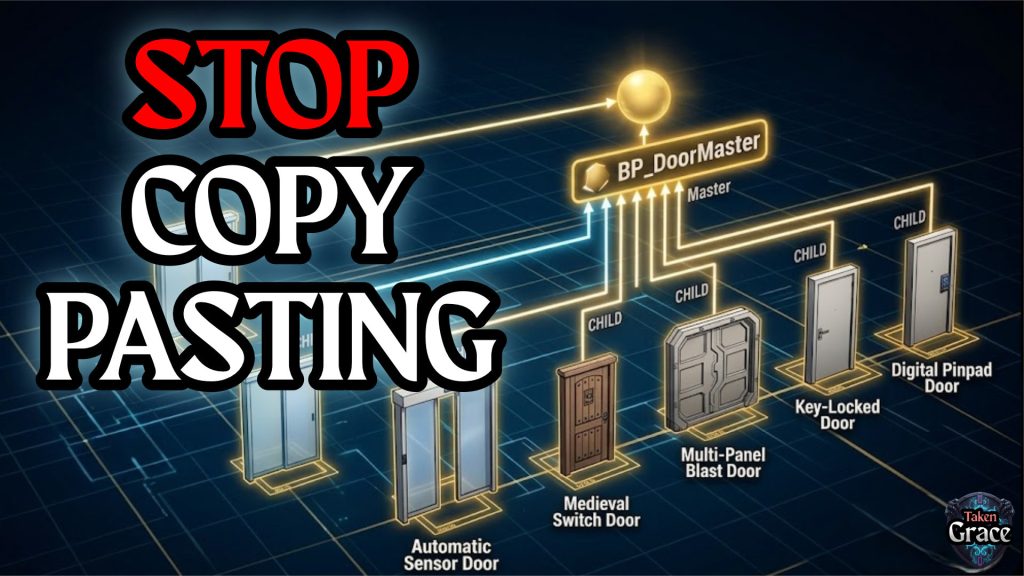
In our latest workshop, we dismantle this habit by establishing BP_DoorMaster. This single parent class holds the “authority” for what a door is (variables for state, sound components, and basic interaction functions), allowing every other door in the game to focus only on what makes it different.
The Workshop Execution: 4 Levels of Logic
| Level | Focus | The “Inherited” Edge |
|---|---|---|
| Junior | Parent Class Setup | Establishes core VInterp/RInterp logic and sound effects variables. |
| Lead | Overrides | Uses Overrides to trigger the parent opening logic via overlaps or external meshes. |
| Senior | Switch Class | Implements Event Dispatchers and direct blueprint communication to create complex, modular communication between actors. |
| Engineer | Key & Lock | Create a scalable key and lock system |
Key Power Moves for High-Level Operators
- Call to Parent Function: Use the “Add Call to Parent Function” node in your overrides to keep the core logic (like playing sounds or updating state) while adding specific child behavior.
- Instance Editable Variables: Define your meshes and sounds in the parent but keep them editable so you can swap visuals in the viewport without ever opening the blueprint.
- Event Dispatchers over Casting: Instead of having a button “Cast To” a specific door, have the door listen for the button’s “scream.” This reduces hard references and keeps your project clean.
The Reality of Scalability
Unreal Engine 5 isn’t just about high-fidelity visuals; it’s about architectural discipline. Are you ready to stop the “Tutorial Hell” grind and start building systems that actually scale? [cite: 2, 6]
Join the Community: Head over to memberships to check out Royal and Sovereign. These member tiers get an additional 20 mins of learning and a couple of nice quailty of life additions
Keep learning until you game over.
